


CLAUDE.md tells your agent how you work. DESIGN.md tells it how things look. I used to stop at those two.
Start a real project and you find that two files are not the system. You also need what you are building, who it is for, how it should sound, what to do next, and where you left off last time. Five more markdown files cover that. A sixth handles the case that tripped me up when I was building Prototo... more than one repo.
The order matters more than you would expect because some of these files read the others. Here they are, in the order you write them.
1. PLAN.md, what you are building
Before you install a single plugin, write down what you are building. Not for the agent yet. For the two files that come right after it.
PLAN.md is the shape of the project before any code. What you are building, who it is for, the core flows, what is in scope and what you are deliberately not building, the constraints. Keep it short enough to read in a minute and honest about the non-goals. The non-goals save you more time than the goals do.
Here is why it goes first, and this part surprised me. When you install the brand and voice plugins and run them, they do not only ask you questions. They read your project folder to ask the right ones. Give them a PLAN.md and the interview is about your actual product. Give them an empty folder and they have nothing to go on but the folder name. I tested it: on an empty folder, the brand it wrote was a guess off the folder name. With a PLAN.md sitting there, the questions got sharp and the output was about my real thing. So the plan is not only for you. It is the foundation the next two files grow from.
2. BRAND.md, who you are
Ask an agent to name a feature and it picks a personality. Ask for a button label and it picks a voice. None of it is wrong, it is only not yours, and it drifts a little further every session. The agent has no idea who the product is for.
BRAND.md is who you are. Audience, personality, the promise, the character. It is the root the words and the design both read from, so they trace back to the same place instead of each one guessing on its own.
I do not hand-write it. The brand plugin runs /brand. It probes you with a good brand designer’s questions, and because it reads what is already in your folder, this is where PLAN.md pays off: with the plan there, the interview is about your real product, not the folder name. Then it writes BRAND.md from your answers.
Here is the part that made me smile the first time. It even draws you a logo. A clean monoline SVG mark, built from the personality it just captured, the kind of thing you would open a design tool for. Then it seeds VOICE.md and DESIGN.md from the same brand, so the words and the look start from who you are.
Open your new project folder:
claude
/plugin marketplace add sherizan/designagent
/plugin install brand@designagent
3. VOICE.md, how you sound
DESIGN.md covers the pixels. It says nothing about the words, which is where AI gives itself away fastest. The em dashes. The hype. The hedging. The copy that reads like every other product.
VOICE.md is how you talk: your personality, your banned words, your punctuation, with examples the agent can match against. Because the plan and the brand came first, the voice starts from who you are, not from scratch. The voice plugin writes it with /voice, then /proofread enforces it on any copy you point at. It strips the AI tells and leaves the substance alone. It will not touch an install command, an id, a tool name, a version, or a line of code.
I run the same rules on this newsletter that VOICE.md enforces in my projects, so I am not selling you a discipline I skip myself.
In the same project folder:
/plugin marketplace add sherizan/designagent
/plugin install voice@designagent
4. BACKLOG.md, what to build next
PLAN.md is the what and the why. It does not tell the agent what to do right now. Without a backlog it starts every session by asking you, or worse, it picks something itself and you find out after.
BACKLOG.md is PLAN.md broken into an ordered queue. Top of the file is the next thing. A “Now” for this session, a “Next” that is ranked, a “Later” you do not have to think about yet, and a short “Done” so the agent has recent context and does not rebuild something you already shipped. The plan is stable, the backlog changes every session. Keeping them in separate files is what lets one hold still while the other moves.
The point is that priority lives in a file the agent reads, not in your head. You stop being the queue.
"Build the next item in @BACKLOG.md that's highest priority"One honest limit. BACKLOG.md works while the queue fits on one screen and it is basically you. The day it outgrows that, or a second person needs it, or items start needing an owner and a link to the actual work, move it to GitHub Issues and a project board. You do not lose the agent when you do. Claude Code reads issues through the GitHub connection, so you point CLAUDE.md at the repo and it still pulls the queue. This file is the training wheels. GitHub is where the backlog grows up.
5. SESSIONS.md, where you left off
Here is the thing nobody warns you about. Close the chat, come back the next morning, and the AI remembers none of it. Not what you built, not what you left half done, not the thing you were waiting on. It is a brand new assistant every day, and you are the only one who remembers yesterday.
SESSIONS.md is where I write yesterday down. It is a running note of where things stand, and I read it first every time I sit back down. Three simple parts: what I am waiting on, the handful of facts I keep having to explain again, and a short dated log of what happened with the newest bit on top. Two lines at the end of a session, and the next one starts already knowing the story.
Of all six files, this is the one I would keep if I could only keep one. A brand can wait a day. Starting from zero every single morning cannot.
"Before we wrap up for the day, sum up what we did to @SESSIONS.md"Advanced: CONTRACT.md, when the project spans more than one repo
Everything above lives in one project folder. The day it grows a second one, things break in a new way. My prototo app is split across a few repos: the desktop app, the website, and a shared core. Change a link format in one and forget to tell the other, and the join between them snaps. Two AIs working in two folders, neither one watching the other.
So the contract does not live inside either app. It gets its own small repo. Mine is called “{projectname}-shared”, and it holds one file that lists everything the repos have to agree on: the link shapes, the shared settings, the version numbers that must move together, and who owns each one. Every repo’s CLAUDE.md pulls in that one file, so every session in every repo loads the same source of truth without me thinking about it. There is even a small script that checks all the repos against the contract and tells me the moment one has drifted.
The rule is simple. Change the contract first, then change the code on either side, never the other way around. Skip this file until you have a second repo. The day you add one, write the contract before the agent decides the join for you.
How the files stack
Read in order, it is one system. PLAN.md is what you are building, and it goes first so the brand and voice plugins have something real to read. BRAND.md decides who you are. VOICE.md keeps the words on brand. DESIGN.md keeps the interface on system. BACKLOG.md is what to do next, and SESSIONS.md is what happened last. CONTRACT.md holds the line between repos when there is more than one.
Which leaves CLAUDE.md, and this is the part I had wrong.
EDIT: CLAUDE.md is the index
My first instinct was to @import all six files into CLAUDE.md so the agent always had everything. It works, and it is wasteful. Every session opens by loading a brand you are not questioning, a contract for repos you are not touching, and a backlog you already know, and the context you wanted for the actual work is spent before you type anything.
An index is smaller. CLAUDE.md says what each file is and when to read it, and the agent goes and gets the one it needs. Two are worth loading every session: SESSIONS.md, because where you left off is always relevant, and PLAN.md, because the goal is always relevant. The rest are pointers. Writing copy, it opens VOICE.md. Touching the interface, DESIGN.md. Second repo, CONTRACT.md. The agent decides in the moment, because the index told it what exists.
The term for this is progressive disclosure, and you already know it from the design side. A design system doc does not open with every component on one page. It gives you a contents list and you open the page you need. Same move here, pointed at an agent instead of a designer.
Credit to Cristian Achiardi for calling this out my first version.
The test is easy to run. If CLAUDE.md is long enough that you skim it, the agent is skimming it too.
You write it down once in files the agent reads when they matter, and let it check its own work against them.
How to make all six (paste these into Claude Code):
If you’re running these, make sure you have Plan Mode activated.
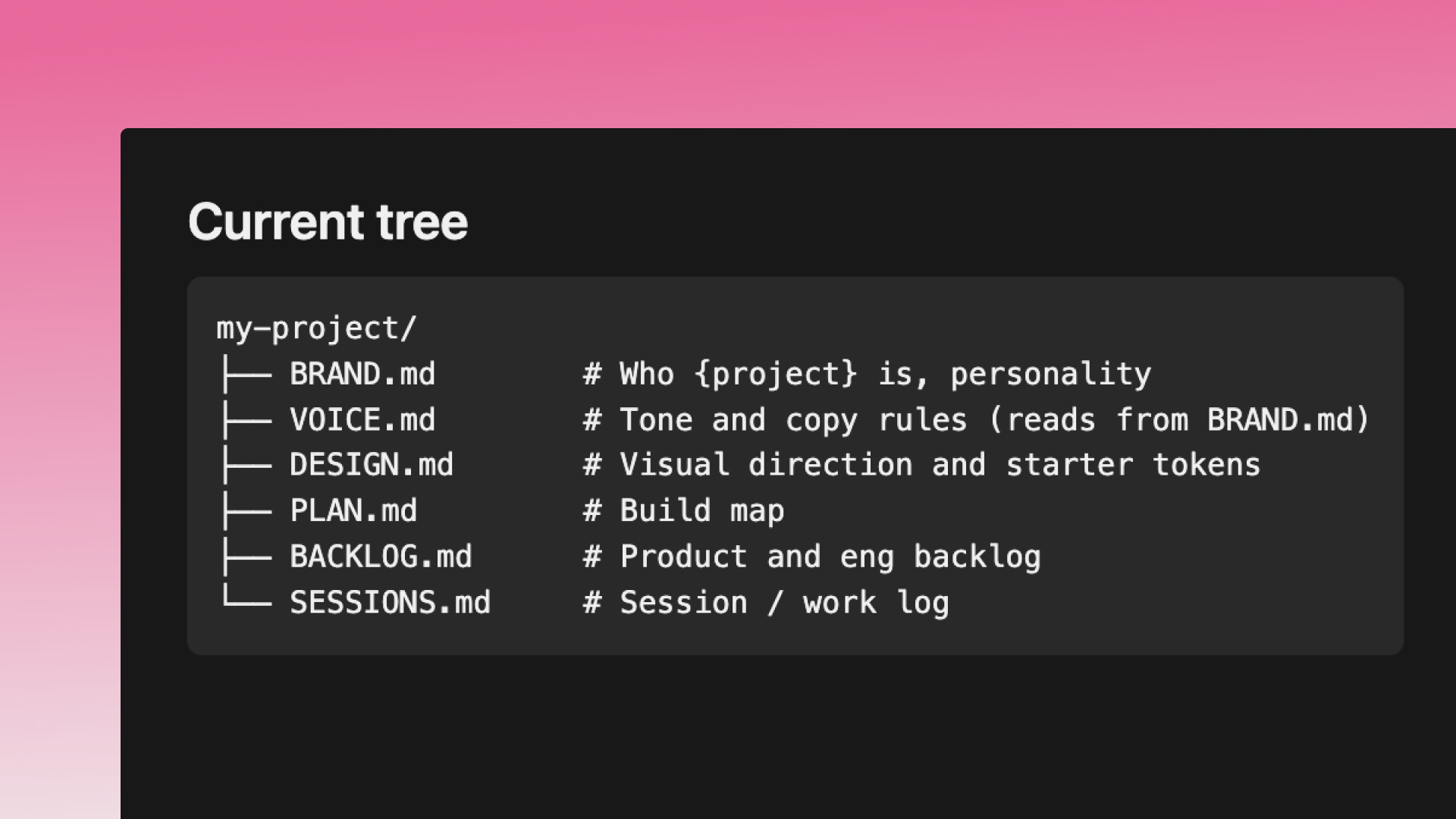
BRAND.md and VOICE.md run from the plugins:
/plugin marketplace add sherizan/designagent
/plugin install brand@designagent
/plugin install voice@designagent

/brand      # interviews you -> BRAND.md + a logo, seeds voice + design
/voice      # writes VOICE.md