


A couple of months back, my team shipped the designs for a new product.
The usual ritual: end-to-end flows, 100% components, zero drifts, zero detached instances.
Everything was clean, consistent, and ready for a perfect handover to engineering.
We marked the section as “Ready for Dev.”
High fives all around. Designers happy. Product happy.
A few days later, our frontend dev came back and said:
“Your designs are not AI-ready”.
🤯 Wait, what?
Turns out our engineers were already deep into AI-assisted development.
Claude Sonnet vs GPT-4 debates. Cursor vs Windsurf arguments. Then Claude Code appeared like a plot twist.
Meanwhile, Figma’s stack… was not built for this world.
Ghost variants. Unnamed layers. Token inconsistencies.
All the things humans ignore but AI absolutely hates.
The result?
AI hallucinated. It misread intent. It wrote janky UI code. Eventually… engineers gave up on the design and started fixing things manually again.
For months, nothing solved it until I remembered something buried inside our Figma Enterprise plan:
Code Connect.
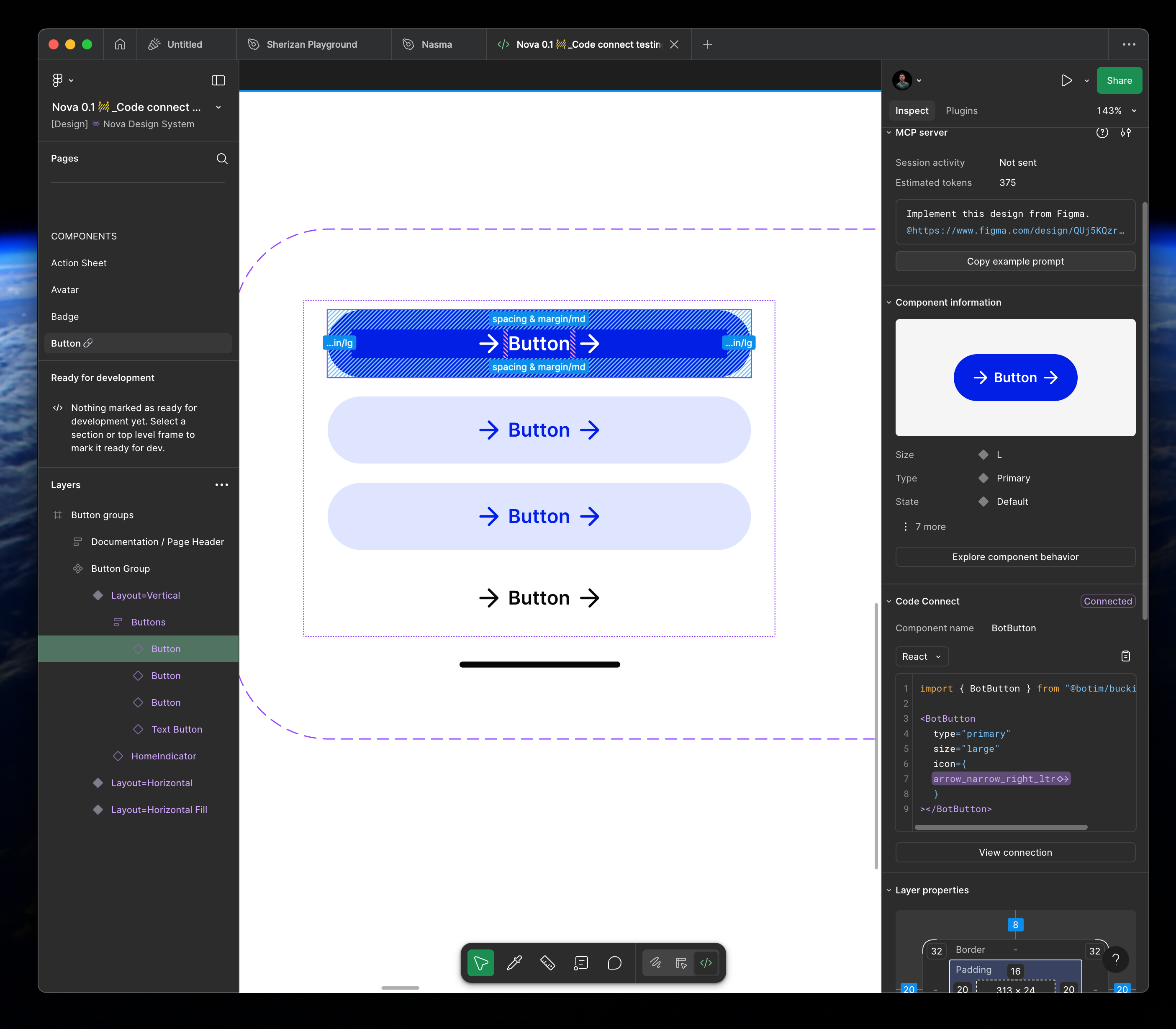
Code Connect is a bridge between your codebase and Figma’s Dev Mode, connecting components in your repositories directly to components in your design files. When implemented, these connections enhance the Figma MCP server‘s ability to guide AI agents with more precise implementation details by giving them direct references to your actual code.
Then came the breakthrough
We finally decided to combine Figma Code Connect + Figma MCP together . We had to fork our existing design system, prioritized the foundation pieces like buttons, form, cards basically the components that appear in almost every flow.
The AI suddenly “understood” our design intent, things started clicking.
The components Cursor produced came straight from the connected codebase (no more regenerating new components every time).
The final product:
Why this stack just works
Reduced design inspection time AI can trace directly to source code
Cleaner handoffs less context lost between design ↔ dev
Fewer UI bugs every component has a single source of truth
Agent-ready components works seamlessly with Cursor, Claude Code, and beyond
How to implement this at your company?
Spoiler: this isn’t a technical project.
It’s an alignment project.
So we got everyone in a room and asked the hard question:
“If AI is already writing code at the speed of thought… where does design fit?”
That’s when we acknowledged three things:
AI saves devs time but also exposes every inconsistency.
Engineers were tired of copy-pasting Figma via “Dev Mode”.
Business cared about one thing: faster execution without compromising UI quality.
So the mission became:
Make our design system AI-native
The Reality Check: It Wasn’t Overnight
This wasn’t a “flip Code Connect and everything magically works” story.
It took weeks of unlearning and rebuilding.
The timeline roughly looked like this:
